GIF compressor · recovery boundary
Can a GIF Compressor Repair a Corrupted GIF?
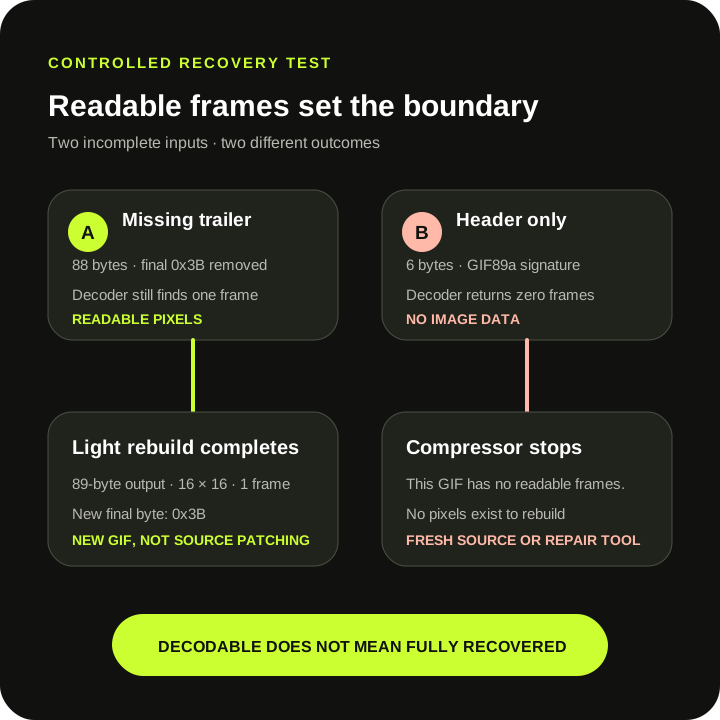
Direct answer: this compressor can rebuild a damaged GIF only when its bundled decoder still returns readable frames. In a controlled production test, an 88-byte GIF missing the required final trailer decoded and became a complete 89-byte output. A six-byte header-only file returned This GIF has no readable frames. This is a narrow re-encoding result, not a general GIF repair feature or a recovery guarantee.
Measured production behavior
One incomplete GIF rebuilt; one empty container stopped
| Controlled input | Production result | What it proves |
|---|---|---|
| 89-byte valid control | One readable 16 × 16 frame; final byte 0x3B | Baseline complete GIF |
88-byte copy with final 0x3B removed | Completed as 89 bytes; output ended in 0x3B | A decodable frame can be rebuilt into a complete stream |
Six-byte GIF89a header only | This GIF has no readable frames. | A signature alone gives the compressor nothing to rebuild |
Method: scripts/verify-gif-compressor-recovery.mjs generated both damaged inputs from the same 89-byte control, selected them in the live production compressor through Chrome, asserted the visible result, fetched the rebuilt Blob, and checked its final byte. The test covers these exact fixtures only.
The recoverable fixture
The missing trailer did not erase the image frame
The GIF89a specification defines a trailer byte, hexadecimal 3B, that marks the end of the data stream. The controlled 88-byte fixture removed only that final byte. Its header, logical screen, color table, image descriptor, image data, and frame control data remained available to the bundled decoder.
The production compressor did not append the missing byte to the source. It decoded the available frame and wrote a new GIF. That rebuilt output measured 89 bytes and ended in 0x3B. Dimensions and the single decoded frame survived, while the stream itself was newly encoded.
This distinction matters: successful output shows decoder tolerance plus re-encoding. It does not prove that the source was otherwise intact, that another viewer would accept it, or that a more severely truncated file can be recovered.
The unrecoverable fixture
A GIF signature is not a frame
The six-byte fixture contained only GIF89a. It had no logical screen descriptor, color table, image descriptor, or image data. The filename passed the initial .gif selection check, but the decoder returned zero frames and the compressor stopped with This GIF has no readable frames.
With no decoded image, this tool has no pixels to quantize and no frame to write. Renaming the file, changing presets, or retrying cannot recreate missing visual data. Use an intact original, download the source again, or use a dedicated recovery tool that actually exposes damaged-frame or color-table repair methods.
Capability boundary
Re-encoding is not the same as general repair
SwapMyGIF has no control to drop a corrupt frame, reset a damaged color table, unoptimize partial frames, reconstruct missing pixels, or choose among repair algorithms. It either decodes readable frames and rebuilds them with the selected preset, or it stops with an error.
A rebuilt file can also change color palettes, dimensions, delays, loop metadata, transparency metadata, and frame sampling. Use Light for the least structural change available here, but still compare the entire output with the original. The error guide maps the earlier selection, byte-size, readable-frame, and canvas gates; this page owns only the narrower question of what happened after two structurally incomplete fixtures reached the decoder.
A cautious recovery test
Work from a copy and verify the rebuilt loop
- Keep the damaged source untouched. Make a copy before trying any decoder or compressor.
- Prefer a fresh source. Re-download or re-export whenever the original program or file is available.
- Try Light on the copy. If the decoder finds frames, the compressor may produce a newly encoded GIF.
- Compare visible content. Check dimensions, every frame, timing, transparency, colors, and the end of the loop.
- Reject incomplete output. A downloadable file is not proof that every source frame or pixel survived.
If the tool reports no readable frames, stop retrying presets. The missing data must come from another source or a dedicated repair workflow.
Direct answers
Corrupted GIF compression questions
Can compression fix a GIF that will not open?
Only in a narrow case where this decoder still reads one or more frames. The measured missing-trailer fixture rebuilt; the header-only fixture did not.
Did the compressor repair the original file?
No. It left the source untouched and created a new GIF from decoded pixels. The new file can differ in structure, palette, timing, loop instructions, and transparency metadata.
Does a missing GIF trailer always recover?
No guarantee is made. One controlled 88-byte fixture without its final 0x3B byte decoded and rebuilt. Other missing or malformed bytes can remove frames or make decoding fail.
What should I do when there are no readable frames?
Use an intact original, download the file again, re-export it, or use a dedicated recovery tool. Changing compression presets cannot recreate image data that this decoder never returned.
Test a copy, not the only source.
A readable frame can be rebuilt. Missing pixels cannot be inferred by this compressor.
Try Light on a copy