GIF compressor · error diagnosis
Why Won't My GIF Compress?
Direct answer: this compressor accepts a file only when its name or media type identifies a GIF, its size is no more than 30 MB, the decoder finds at least one image frame, and the logical canvas area is no more than 2,073,600 pixels. A controlled production test triggered a different visible message at each gate. Match the exact message before resizing, renaming, or replacing the source.
Measured production behavior
Five fixtures separated four failures from one valid control
| Fixture | Observed production result | When it stopped |
|---|---|---|
| 10-byte text file | Choose an animated GIF file. | Before the button enabled |
31,457,281-byte .gif | GIF must be 30 MB or smaller. | Before the button enabled |
| 20-byte GIF89a container with no image | This GIF has no readable frames. | After starting the run |
| 89-byte GIF declaring 1921 × 1080 | Canvas is larger than 1920 × 1080 | After decoding one frame |
| 89-byte 16 × 16 one-frame GIF | Completed · 16 × 16 · 1 frame | Valid control |
Method: scripts/verify-gif-compressor-errors.mjs generated all five files, selected each one in the live production tool through Chrome, captured the exact visible state, and asserted every message plus the successful control. The 30 MB fixture was exactly one byte above the limit.
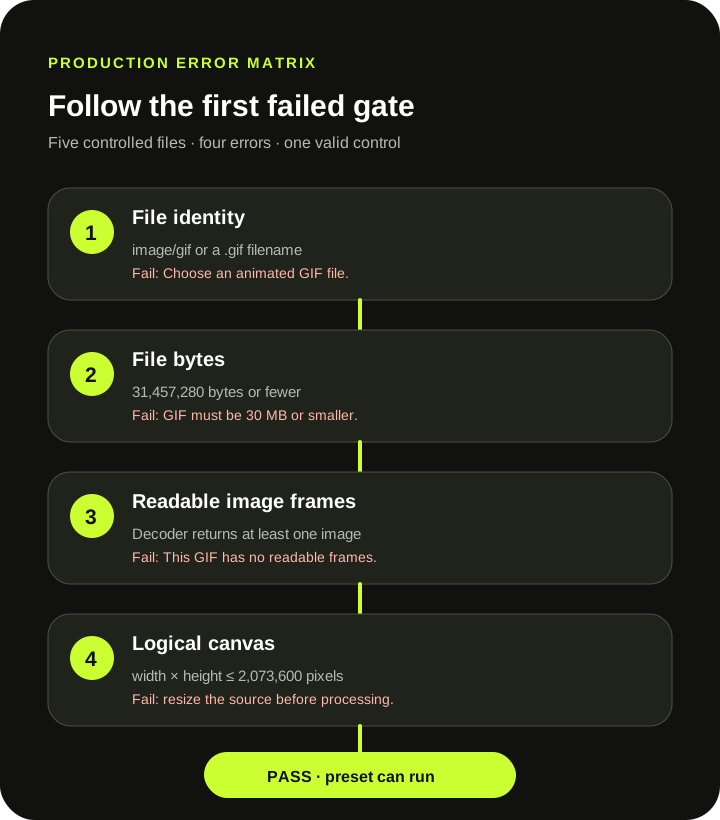
Selection gates
The first two messages appear before compression starts
Choose an animated GIF file. means the selected file had neither the image/gif media type nor a name ending in .gif. The current check accepts either signal. That makes selection convenient, but a renamed file can still pass this first gate and fail during parsing.
MDN notes that a browser's Blob type is commonly inferred from the filename extension rather than by reading the byte stream. A suffix is therefore a hint, not proof that the contents form a valid GIF.
GIF must be 30 MB or smaller. is a strict file-byte gate. The limit is 31,457,280 bytes. The controlled 31,457,281-byte file failed immediately, before any decoder or preset ran. Changing presets cannot bypass this gate because preset work begins later.
Decode gates
A selected .gif can still lack a usable animation
The 20-byte fixture contained a GIF89a header, a one-pixel logical screen, a two-entry color table, and a trailer—but no image descriptor or image data. It passed selection because its filename ended in .gif. After parsing, the decoder returned zero image frames and the tool displayed This GIF has no readable frames.
The GIF89a specification separates the logical screen from image descriptors and image data. A container header by itself is not an animated image. Export the source again from the program that created it; changing the filename cannot add missing frame data.
A different decoder exception can indicate truncated bytes, malformed blocks, or a structure this bundled parser cannot read. The tool reports the actual exception when one is available. The controlled recovery-boundary test shows why one incomplete but decodable stream rebuilt while a header-only file did not; it does not turn the compressor into a general repair tool.
Canvas gate
File bytes and canvas pixels are different limits
The 89-byte large-canvas fixture was tiny on disk and contained one readable 16 × 16 image block, but its logical screen declared 1921 × 1080. The visible message names 1920 × 1080, while the implementation compares width × height with 2,073,600 pixels. This fixture exceeded that pixel-area boundary before drawing or quantizing the output.
This is not the same issue as the 30 MB limit. A small encoded file can declare a large canvas, and a larger file can use a modest canvas. Resize the source canvas with the GIF resizer before reopening the compressor. For why decoded pixels can outweigh file bytes, use the decoded-size audit.
A short diagnosis
Change only the input property named by the error
- Copy the exact message. Do not reduce colors or frames before knowing which gate failed.
- Check identity first. Confirm that the source is an actual GIF export, not another format renamed to
.gif. - Check exact bytes. Files above 31,457,280 bytes must be reduced before this compressor can read them.
- Check whether the source plays elsewhere. A header without image frames, truncated file, or malformed block needs a fresh export or repair outside this compressor.
- Check logical canvas area. Resize until width × height is no more than 2,073,600 pixels before trying again.
Keep the original while diagnosing. A successful retry still rebuilds dimensions, palettes, timing, loop metadata, and frames according to the selected preset.
Direct answers
GIF compressor error questions
Why does a .gif file say it has no readable frames?
The filename passed the selection check, but the decoder found no image frames. Re-export or repair the source; renaming it again will not create frame data.
Can I compress a GIF larger than 30 MB with Smallest?
No. The file-size gate runs before a preset. Reduce the source below 31,457,281 bytes first, then reopen it.
Why can a tiny file fail the canvas limit?
Encoded file bytes and logical canvas pixels are different measurements. The controlled 89-byte fixture declared a 1921 × 1080 screen and exceeded the 2,073,600-pixel area boundary.
Does a decoder error prove my GIF is corrupt?
No. It proves only that this bundled parser could not complete the current file. Truncated data, malformed blocks, or an unsupported structure are possible; the compressor is not a repair tool.
Use the first failed gate.
File identity, file bytes, frame data, and canvas pixels require different fixes.
Try the compressor