GIF compressor · partial-frame audit
Does a GIF Compressor Preserve Partial Frames?
Direct answer: this compressor preserves the rendered canvas, not the source's partial-frame geometry. In a controlled production test, a 4 × 4 second-frame patch positioned at (6, 6) was composited over a 16 × 16 first frame. Light rebuilt both output frames as full 16 × 16 images. The two rendered-state hashes and 100/140 ms delays matched, while the file changed from 125 to 154 bytes.
Measured production behavior
The visible states matched; the frame rectangles did not
| Record | Source | Light output |
|---|---|---|
| File bytes | 125 bytes | 154 bytes |
| Frame 1 rectangle | 16 × 16 at (0, 0) | 16 × 16 at (0, 0) |
| Frame 2 rectangle | 4 × 4 at (6, 6) | 16 × 16 at (0, 0) |
| Decoded delays | 100 ms, 140 ms | 100 ms, 140 ms |
| Disposal methods | 1, 1 | 2, 2 |
| Rendered-state hashes | Matched for both displayed frames | |
Method: scripts/verify-gif-compressor-partial-frames.mjs generated a full red first frame and a blue 4 × 4 second-frame patch at offset (6, 6), ran Light through the live production compressor, decoded both files, composited their frames, and compared SHA-256 hashes of each complete rendered canvas. The result applies to this fixture only.
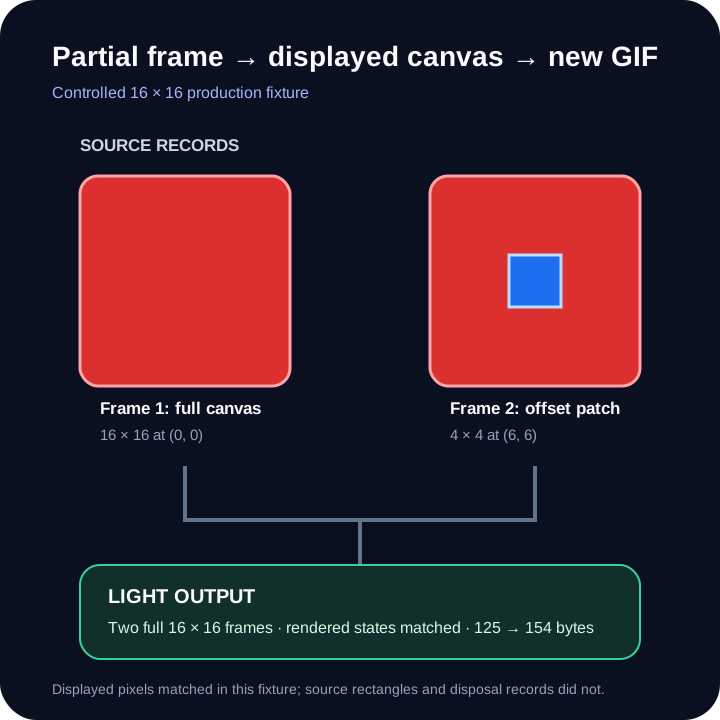
What a partial frame stores
An optimized frame can describe only the pixels that changed
The GIF89a specification gives each image descriptor a left position, top position, width, and height inside the logical screen. A later frame can therefore store a small rectangle instead of repeating every pixel in the full canvas.
The controlled source used a 16 × 16 logical screen. Its first frame filled that screen. Its second frame contained only a 4 × 4 patch with left and top positions of six pixels. Disposal method 1 left the first displayed canvas in place, so the patch appeared on top of it.
What this compressor writes
Every retained state is flattened into a full canvas
The current implementation applies the previous frame's disposal rule, draws each decoded patch at its recorded offset, and keeps a complete compositor canvas. For a retained frame, it scales that complete canvas, builds a new local palette, and writes a new full-size image.
That is why the second source rectangle changed from 4 × 4 at (6, 6) to 16 × 16 at (0, 0). This is a coalescing-style rebuild: the visible state survived in the measured fixture, but the compact source rectangle and source disposal metadata did not.
Flattening can also add bytes. Here the output was 29 bytes larger even though Light kept the same logical dimensions and two frames. The larger-output guide explains why a new encoding pass is never a size guarantee.
Evidence boundary
A matching fixture does not prove every optimized GIF is safe
This test covers two frames, disposal method 1, one opaque patch, and one Light run. It does not cover transparent patch pixels, disposal method 2 or 3, interlacing, malformed rectangles, many nested updates, palette edge cases, or frames removed by Smallest.
For transparency and disposal-specific evidence, use the controlled transparency audit. For structural damage, use the corrupted-GIF boundary. Those are separate questions from whether an intact offset patch is composited correctly.
A practical review
Replay the whole loop after partial frames are flattened
- Keep the source. The output does not preserve the original frame rectangles or disposal records.
- Start with Light. It retains every decoded frame and the original logical dimensions.
- Watch changing regions. Look for stale pixels, missing backgrounds, trails, and flashes at update boundaries.
- Compare timing. Confirm that each displayed state still lasts as expected.
- Keep only a verified output. Matching dimensions and frame count alone do not prove identical rendering.
Direct answers
Partial-frame compression questions
What is a partial GIF frame?
It is an image rectangle positioned inside the logical screen. It can store only a changed region while the viewer keeps pixels from earlier frames according to disposal rules.
Does Light preserve partial-frame rectangles?
No. In the controlled test, Light rebuilt both retained states as complete 16 × 16 frames. It preserved the measured displayed pixels, not the 4 × 4 source rectangle.
Why did the output become larger?
The compact second-frame patch became a full-canvas frame and the encoder wrote a new stream. The measured file grew from 125 to 154 bytes; another GIF can behave differently.
Can matching frame counts prove the animation is unchanged?
No. Frame count does not verify offsets, disposal, transparency, timing, or rendered pixels. Replay the complete output and compare the changing regions.
Compress a copy, then inspect every update.
The output keeps displayed states only when composition succeeds.
Try Light first